MS Project Online retires 20 Sept 2026. Start your migration today and avoid the last-minute rush.

Book a migration call
MS Project Online Alternative

MS Project Online is ending. Your projects don't have to.

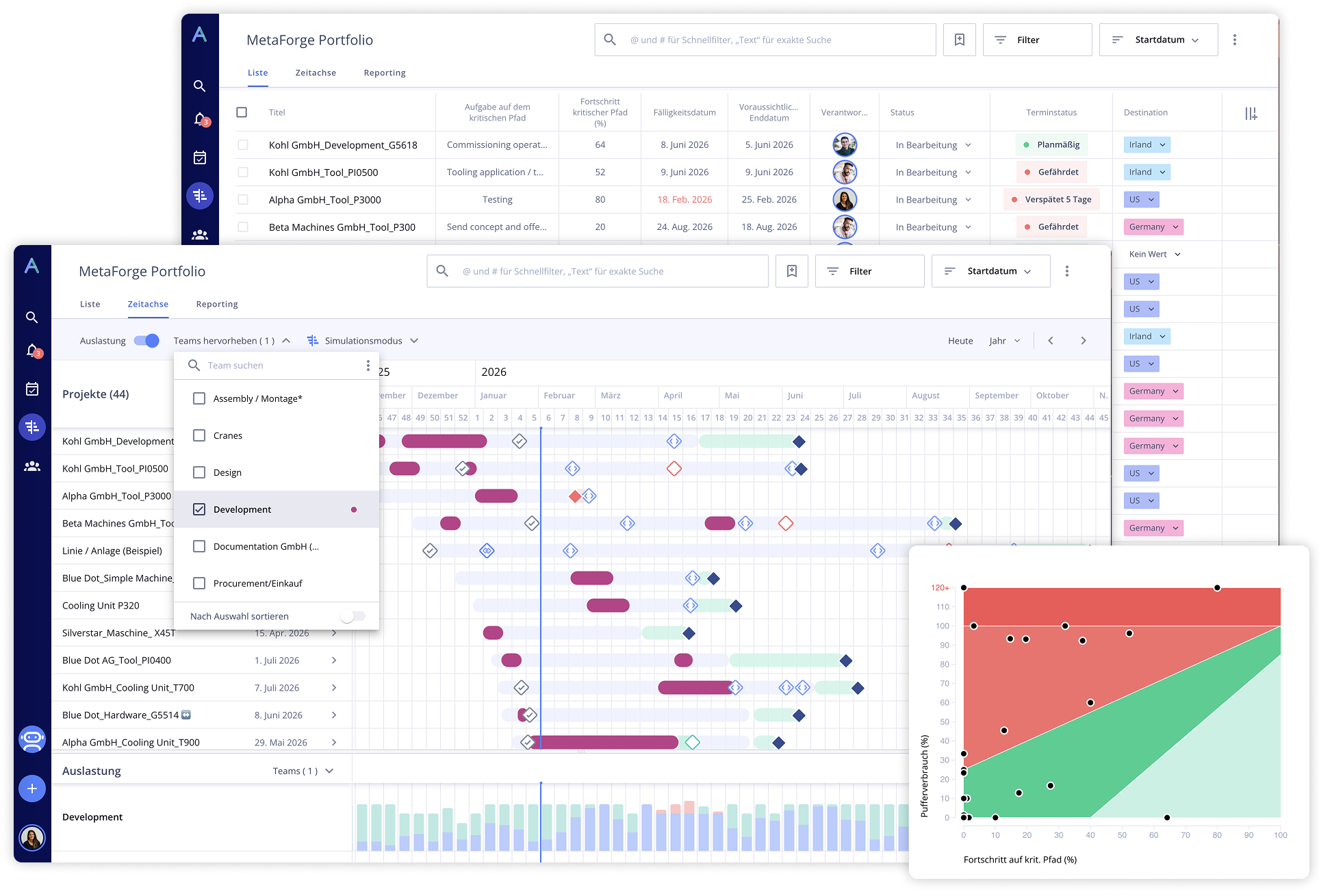
Microsoft Projects (Online) is retiring. Allex.ai gives you a familiar way of working, better portfolio visibility, and a migration team that handles the hard parts.

Hero image

Join more than 10,000+ professional industry users worldwide!

Weinor
Unitechnik
Stopa
Sempre
Riani
Rexroth
Lonza
Kampf
Iwis
Groninger
Fischer
Broetje
Beck
Why Allex.ai

Everything you need to migrate with confidence

Built for teams leaving MS Project Online. Familiar enough to adopt fast, powerful enough to replace it entirely.

Familiar UX, no steep learning curve

Gantt charts, resource views, and task structures your PMs already know. Import your MPP files directly.

Zero retraining

Portfolio-wide visibility, out of the box

Real-time dashboards across all projects and resources. No add-ons, no custom development required.

Go live in weeks, not months

A dedicated migration engineer and structured onboarding gets your team up and running fast.

Lower TCO, simpler licensing

Transparent per-seat pricing with no module add-ons. Teams consistently report 25–30% lower total cost.

Built for enterprise governance

SSO, Azure AD integration, role-based access, and audit trails. Ready for IT and compliance from day one.

Microsoft 365 integrations included

Connects with Teams, SharePoint, Azure AD and more. Your existing stack stays intact through the migration.

Feature Comparison

Allex.ai vs. MS Projects Online

See what you gain by making the switch.

Feature
MS Project Online
Allex.ai
Gantt & timeline views
Included
Portfolio-level visibility
Limited / manual
Real-time across all projects
Cross-project resource management
Manual leveling
Dynamic & real-time
Resource capacity planning
Limited
Live workload visibility
What-if scenario planning
Limited
Built-in simulations
Custom workflows & calendars
Complex to maintain
Configurable & flexible
AI-assisted planning & automation
Built-in
Multi-methodology support
Primarily Waterfall
Agile, Waterfall, CCPM
MPP & Project Online data migration
Manual export required
Guided with 98%+ fidelity
Continued support post Sept 2026
Retiring
Fully supported
Customer Successes

Teams that already made the move

Broetje Automation currently handles between 60 and 80 projects simultaneously. This made it difficult to maintain an overview of the portfolio and ensure customer satisfaction. Thanks to Allex, Broetje can now provide greater transparency and use methods such as CCPM to its advantage. Allex enables Broetje Automation to manage all data in a single tool. Bottlenecks can be identified early on in the portfolio and countermeasures can be taken in good time.

André Baumann
VP Project Management, Broetje-Automation GmbH

With Allex, we have succeeded in ensuring that project plans reflect reality. The status is transparent, which enables us to respond to deviations at an early stage and actively manage them.

Pascal Kottenstein
Head of Operations and Industrial Engineering, Groninger GmbH & Co.KG

We chose Allex because it fits our requirements better than traditional project management tools. It brings clear structure to our projects, supports us in scheduling and resource planning, and makes collaboration within the team easier. This allows us to see the current project status at any time and identify early where action is needed.

Julia Bittner
Project Management Office, GOFAST

We have reduced project lead times by at least 25%, and we are now bringing more machines to market in less time, which is also having a positive impact on our results.

Remo Rickler
CSO, Christof Fischer GmbH
FAQ

Common migration questions

When exactly does MS Project Online retire?+

Microsoft Project Online is retiring on 30 September 2026. After that date, the service will no longer be accessible or supported.

We recommend beginning your migration by Q1 2026 to avoid last-minute risk and ensure enough time for proper validation and onboarding.

What happens to our data after Project Online is retired?+

After September 30, 2026, Project Online environments (including PWA) become inaccessible, and any data not exported beforehand will be permanently lost, including:

  • Projects and portfolios
  • Resource pools and allocations
  • Baselines, calendars, and custom fields

There is no Microsoft-provided recovery after the cutoff, which is why most PMOs are prioritizing early export and validation.

Is Microsoft Planner a replacement for Project Online?+

Microsoft positions Planner (with Premium features) as the successor, but it’s designed for a different level of complexity.

For teams managing multiple interdependent projects, shared resources, and detailed schedules, common gaps include:

  • No native cross-project resource management
  • Limited portfolio-level visibility
  • Reduced support for advanced scheduling and baselines

Planner works well for lighter coordination, but many PMOs find it requires workarounds for enterprise-scale planning.

What are the best alternatives to Microsoft Project Online?+

Most teams evaluate a mix of options, including Planner, Project Server (on-prem), and modern cloud platforms.

The key difference comes down to depth vs. simplicity:

  • Lightweight tools (Asana, Monday, etc.) are easy to adopt but often lack portfolio and resource control
  • On-prem solutions maintain familiarity but add infrastructure overhead
  • Purpose-built platforms like Allex.ai focus on multi-project environments, shared resources, and real-time portfolio visibility

The right choice depends on how critical those capabilities are to your operations.

Can we migrate our existing Project Online data (including resources and custom fields)?+

Yes. Allex.ai supports migration of MPP files and Project Online exports, including:

  • Projects, tasks, and dependencies
  • Resource pools and allocations
  • Custom fields, calendars, and workflows

Our migration team:

  • Audits and maps your data structure
  • Validates everything before go-live
  • Maintains 98%+ data fidelity across standard project environments
How long does a typical migration take?+

Most migrations follow a structured timeline:

  • 4–8 weeks for mid-market environments
  • 8–12 weeks for larger or more complex portfolios

You’ll receive a detailed migration plan after the initial scoping call, including data validation, pilot testing, and rollout phases.

What are the risks of switching from Project Online?+

The main risks aren’t usually technical, but operational. Common challenges teams run into:

  • Loss of portfolio visibility across projects
  • Broken custom elements (fields, calendars, workflows)
  • Reduced control over resource planning
  • Low adoption if the new tool feels too limited

A structured migration (with proper validation and onboarding) is what prevents these issues—and turns the transition into an upgrade rather than a downgrade.

September 2026 is approaching fast

Book your free 30-minute migration call now. We’ll scope your environment, answer your questions, and give you a clear timeline. No commitment needed.

Book your free migration call

Typically scheduled within 2 business days